
Music app development cost
The cost to build a music streaming app in 2026 typically ranges from $25,000 for a focused MVP to $400,000+ for a full-scale Spotify clone. Where you land depends on features, platforms, your content strategy and how legally you source the music.
Music app development is one of the most exciting (and misunderstood) areas of software today. Founders, labels and indie artists all want to launch a new music app, but most early budgets miss the biggest cost drivers: licensing, streaming infrastructure and the tightening rules around third-party music APIs.
In this guide, our team at DEVTYX breaks down the real music streaming app cost for 2026: what you pay for, what the Spotify API, Apple Music API and YouTube Music API will and won't let you do, and how to build a music streaming platform that scales without wasting budget.
Whether you want to build a music app for listeners, an indie music app for artists, or a desktop music player with a unified music experience, this is your starting point.
Music Streaming App Cost 2026: Quick Breakdown
Most projects fall into one of three tiers. These are typical market ranges; your final number comes from a scoped discovery session.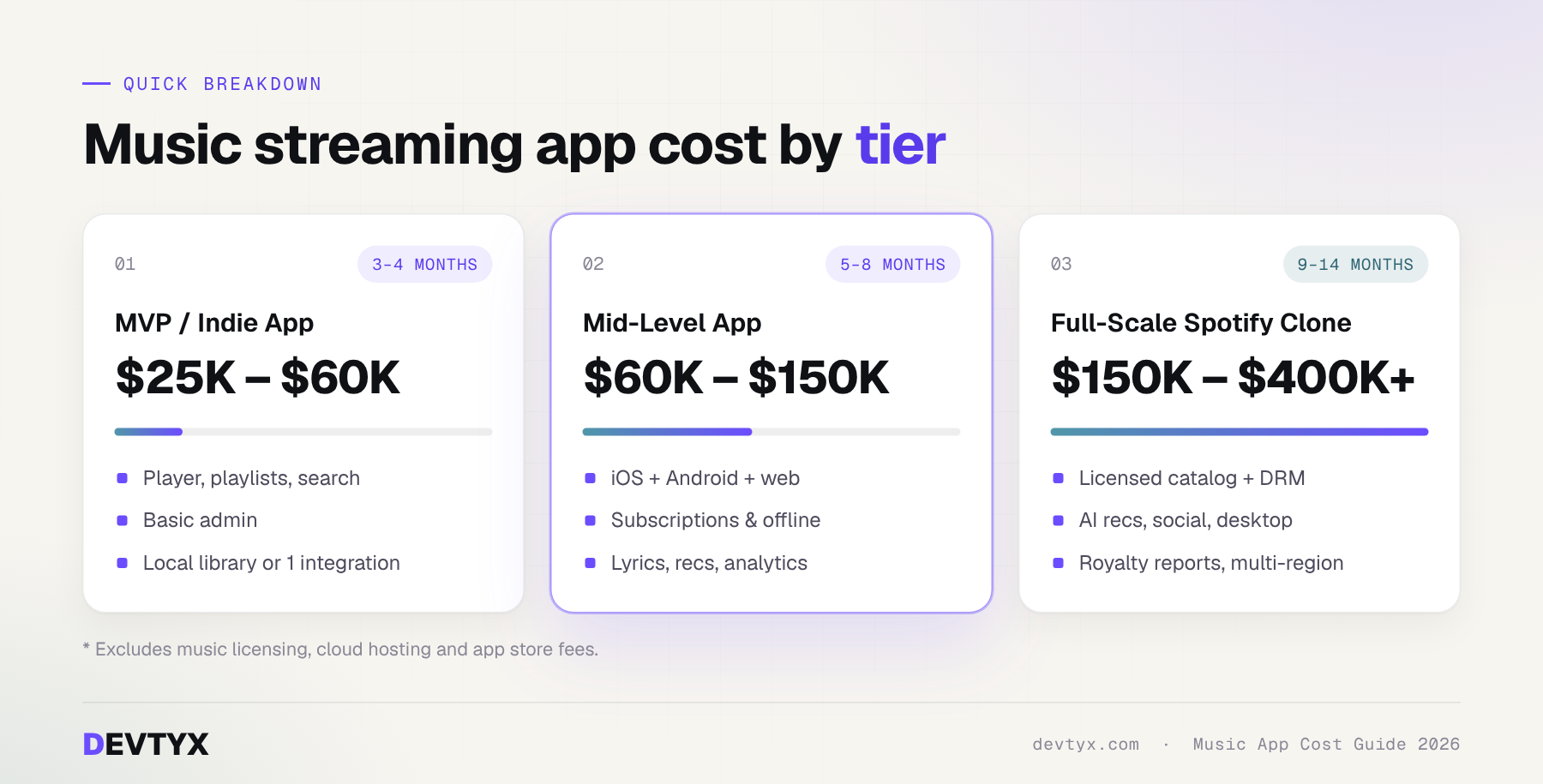
| App tier | What you get | Estimated cost (USD) | Timeline |
|---|---|---|---|
| MVP / indie music app | One platform or cross-platform, player, playlists, search, basic admin, local music library or one streaming integration | $25,000 – $60,000 | 3 – 4 months |
| Mid-level music app | iOS + Android + web, subscriptions, offline compatibility, lyrics, recommendations, artist uploads, analytics | $60,000 – $150,000 | 5 – 8 months |
| Full-scale Spotify clone | Licensed catalog, AI recommendations, social features, DRM, desktop app, royalty reporting, multi-region cloud | $150,000 – $400,000+ | 9 – 14 months |
Licensing fees, cloud hosting and app store fees are not included above. We cover them below, because they often decide whether a music streaming platform is viable at all.
7 Factors That Drive the Cost to Build a Music Streaming App
- Content source. Will users play their own files (local music playback), stream your licensed catalog, or connect third-party music services? This single choice changes your budget more than anything else.
- Platforms. iOS, Android, web and a desktop music player each add scope. Cross-platform frameworks like Flutter or React Native can cut mobile costs by 30–40%.
- Feature depth. A basic player is cheap. Offline downloads, synced lyrics, AI recommendations and social listening add weeks each.
- Streaming infrastructure. Adaptive bitrate, CDN delivery and transcoding are core to music streaming app development and scale with your audience.
- Security and DRM. Licensed content requires encryption and DRM, which adds both build time and per-stream costs.
- Design quality. A polished, custom UI/UX costs more than a template, but it drives retention in a crowded market.
- Team location and model. Rates vary widely by region. An experienced offshore music streaming app development company can deliver the same quality at a fraction of US agency rates.
How to Legally Build Music Apps: APIs, Licensing and DRM
The biggest mistake founders make is assuming they can plug into Spotify or YouTube and stream everything for free. In 2026, streaming API restrictions are tighter than ever. You have three legal paths.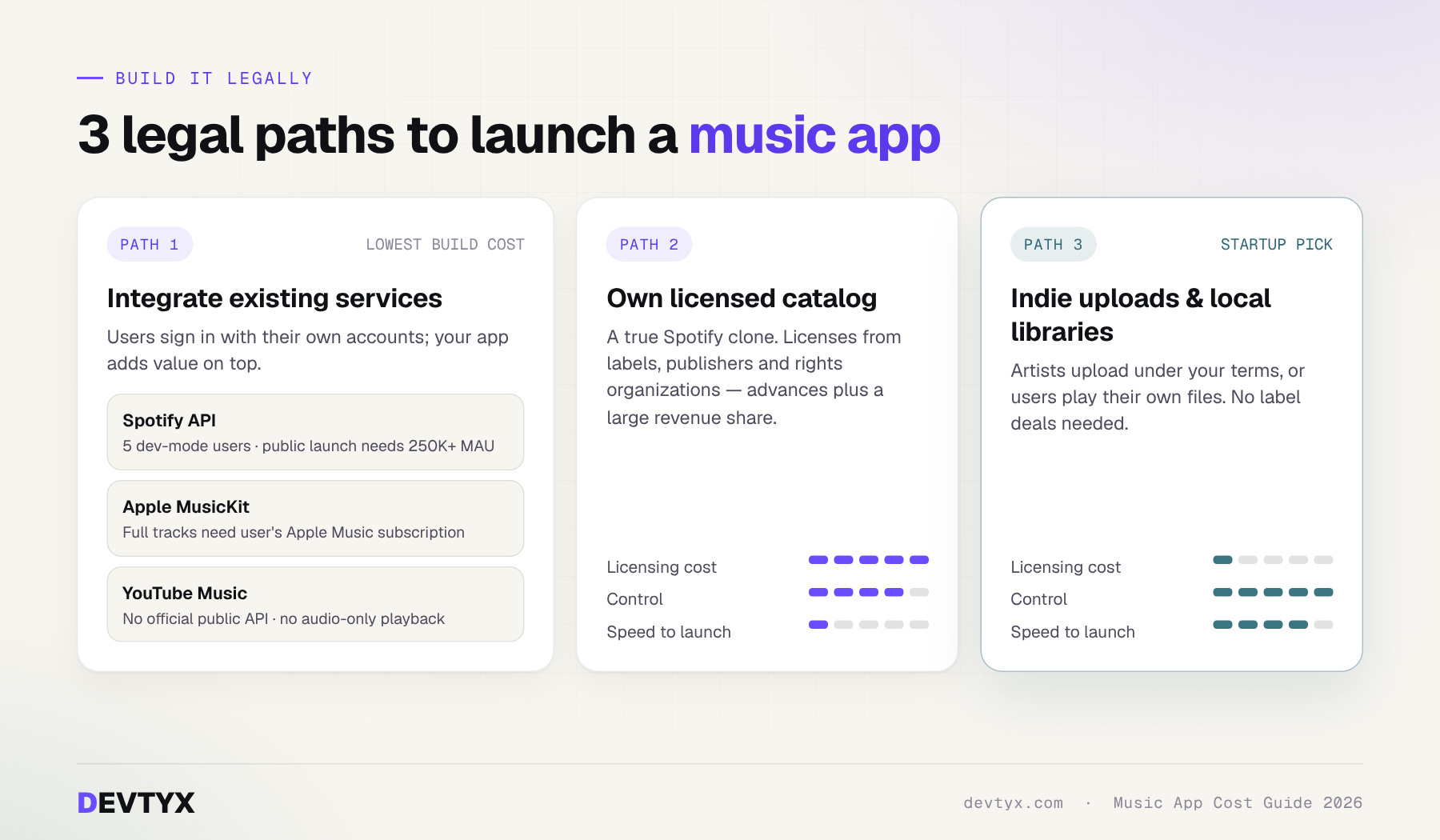
Path 1: Music Streaming Integration With Existing Services
This is the most budget-friendly way to build a music app with streaming services. Users sign in with their own accounts (user-linked accounts), and your app adds value on top: better playlists, music stats, song moments, collections or a unified music experience across services.
| API | What it allows | Key restrictions in 2026 |
|---|---|---|
| Spotify API | Metadata, playlists, library and playback control | Development mode allows only 5 allowlisted users. Extended quota (public launch) is limited to registered businesses with a launched service and 250,000+ monthly active users. Several endpoints, including recommendations and audio features, are no longer available to new apps. |
| Apple Music API / MusicKit (Apple Music Kit) | Catalog search, library access and full playback on Apple devices and web | Requires an Apple Developer Program membership. Users need an active Apple Music subscription for full-track playback. |
| YouTube Music API | No official public YouTube Music API exists | The YouTube Data API covers videos and playlists, but its terms do not allow separating audio from video or background audio-only playback. |
What this means for cost: third-party music apps save you licensing fees, but API playback permissions and API monetization restrictions limit what you can charge for. Most platforms forbid selling access to their content itself, so you monetize your own features instead. Design your app so it does not depend on one API; Spotify alone changed its developer rules several times between 2025 and 2026
Path 2: Your Own Licensed Catalog (a True Spotify Clone)
To stream commercial music directly, you need licenses from record labels (sound recordings), publishers and collecting societies (compositions), and often performance rights organizations. Music licensing fees usually combine upfront advances with a revenue share, commonly well over half of streaming revenue across rights holders. For most startups, licensing costs more than the software.
Path 3: Indie Music App Development and Local Libraries
The smartest route for many startups. Build an indie music app where artists upload their own music under your terms, or a player focused on local music playback from the user's own files. No label deals are needed, and you control the entire experience.
DRM and Content Protection
If you stream licensed or premium content, DRM is required. Expect to budget for Widevine (Android/Chrome), FairPlay (Apple) and encrypted offline storage. Plan $5,000–$20,000 in development plus per-license fees from your DRM provider.
Feature-by-Feature Cost Breakdown
Here is what individual features typically add when you develop a music app. Ranges assume a cross-platform mobile build.
| Feature | What it does | Estimated cost (USD) |
|---|---|---|
| User accounts and access management | Sign-up, social login, roles, subscriptions | $3,000 – $8,000 |
| Core music player | Play, pause, queue, shuffle, background and lock-screen controls | $4,000 – $10,000 |
| Local music library | Scan device files, read tags, local music playback | $3,000 – $7,000 |
| Playlists and music collections | Create, edit, share and organize collections | $3,000 – $7,000 |
| Song moments / saved clips | Save song timestamps, replay song sections, share clips | $4,000 – $9,000 |
| Music stats | Listening history, top artists, yearly recaps (like playlist apps and music stats apps) | $4,000 – $10,000 |
| Search and metadata | Fast search by song, artist, album and mood | $3,000 – $8,000 |
| Offline compatibility | Encrypted downloads, sync when back online | $5,000 – $12,000 |
| Streaming service integrations | Spotify API, Apple MusicKit and other service integrations in one app | $6,000 – $20,000 |
| Synced lyrics | Real-time lyrics with licensed lyric providers | $3,000 – $8,000 |
| AI recommendations | Personalized mixes and discovery | $10,000 – $40,000 |
| Social features | Follow, share, comments, listening parties | $6,000 – $15,000 |
| Admin panel and artist portal | Content uploads, moderation, analytics, royalty reports | $8,000 – $25,000 |
| Payments and subscriptions | In-app purchases, free trials, plans | $4,000 – $10,000 |
Tip: features like song moments, saved clips and cross-service music collections are strong differentiators. They let a new app stand out without competing with Spotify on catalog size.
Music App Architecture: Where the Money Goes Under the Hood
Good software architecture is what separates a music app that scales from one that breaks at 10,000 users. A modern music app architecture has five layers:
- Client apps — iOS, Android, web and desktop, sharing one design system.
- API and service layer — handles user data management, access management, playlists and service integrations.
- Streaming layer — audio transcoding, adaptive bitrate (HLS/DASH) and CDN delivery.
- Data layer — metadata storage for tracks, artists and albums; user libraries; listening history for stats and recommendations.
- Integration layer — streaming platform integration with the Spotify API or Apple MusicKit, plus payments and analytics.
User-Linked Accounts and Own API Keys
For apps built on third-party services, a smart pattern is letting users connect their own accounts, or in developer-focused tools even their own API keys. Each user authenticates directly with the service, which keeps you within API rules and reduces your liability.
Data Minimization
Store only what you need. Data minimization lowers cloud costs, simplifies GDPR and privacy compliance, and builds user trust. For example, store song IDs and timestamps for saved clips rather than copying audio.
Typical Tech Stack
- Mobile: Flutter, React Native, Swift, Kotlin
- Web and desktop: Next.js, React, Electron or Tauri
- Backend: Node.js, Python, PostgreSQL, Redis
- Audio: ExoPlayer, AVFoundation, FFmpeg, HLS
- Cloud: AWS, Google Cloud or Azure with a global CDN
Architecture and backend work usually represents 30–40% of the total cost to build a music streaming app.
Desktop Music Player and Platform Costs
Mobile gets most of the attention, but a desktop music player is often where power users spend hours every day. Here is what each platform adds on top of a base product:
| Platform | Typical added cost (USD) | Notes |
|---|---|---|
| Second mobile platform (native) | $15,000 – $50,000 | Mostly avoided with Flutter or React Native |
| Web player | $10,000 – $30,000 | Great for sharing links and SEO |
| Desktop app (Windows, macOS, Linux) | $12,000 – $40,000 | Electron or Tauri reuse web code |
| CarPlay / Android Auto | $5,000 – $15,000 | Strict UI rules from Apple and Google |
| Smart TV and wearables | $8,000 – $25,000 each | Best added after launch |
Desktop App Design Tips
- Design for keyboards, media keys and multi-window use, not just a stretched phone layout.
- Support local music libraries with large collections of thousands of files.
- Keep playback state synced across devices so users get one unified music experience.
Ongoing Costs After You Launch a New Music App
Building the app is only the first bill. Plan for these recurring costs:
| Cost | Typical range | Notes |
|---|---|---|
| Cloud hosting, storage and CDN | $300 – $10,000+ / month | Grows with streams and audio quality |
| Maintenance and updates | 15 – 20% of build cost / year | OS updates, API changes, bug fixes |
| Music licensing fees | Revenue share + advances | Only for licensed catalogs |
| DRM and lyrics providers | Per stream or per user | Scales with usage |
| App store fees | 15 – 30% of in-app purchases | Plus $99/year Apple and $25 one-time Google |
| Marketing and user acquisition | Varies | Often the largest cost after launch |
Because music APIs change often, budget for regular updates. Treat API compliance as ongoing work, not a one-time task.
How to Build a Music App (and Keep Costs Under Control)
If you're wondering how to create a music app without overspending, follow this path:
- Pick your content model first. Local library, indie uploads, streaming integration or licensed catalog. This decides your legal and technical scope.
- Define one clear differentiator. Song moments, music stats, a unified music experience, or a niche audience. Don't try to out-Spotify Spotify.
- Start with an MVP. Launch the core player, playlists and your differentiator, then add features based on real user data.
- Go cross-platform. One codebase for iOS and Android saves a large share of mobile cost.
- Design the architecture for scale. Cheap shortcuts in streaming and metadata storage become expensive rewrites later.
- Plan for API changes. Keep integrations modular so one service changing its rules doesn't break your app.
- Test audio on real devices. Bluetooth, background play and poor networks reveal the bugs users notice most.
- Launch, measure, iterate. Use listening data to decide what to build next.
Following these steps, many teams can build a music streaming app MVP in 3–4 months and validate it before committing to a full-scale budget.
Why Choose DEVTYX as Your Music Streaming App Development Company
DEVTYX has been building digital products since 2009, with 70+ products delivered for 120+ clients across 23+ countries and a 98% client satisfaction rate. Our music application development team covers the full lifecycle: discovery, UI/UX design, engineering, cloud deployment and growth.
- Legal-first planning so your app follows API rules and licensing requirements from day one
- Scalable architecture on AWS, Google Cloud or Azure
- Flexible engagement: fixed-price projects or monthly retainers
- Fast start: projects usually kick off within about 2 weeks
- Clear communication: we reply to every inquiry within 24 hours
Frequently Asked Questions
How much does it cost to build a music streaming app in 2026?
Most projects range from $25,000 for an MVP to $400,000+ for a full-scale platform, before licensing and hosting costs.
Can I build a Spotify clone legally?
Yes, but streaming commercial music requires licenses from labels, publishers and rights organizations. Many startups start with indie content, local playback or user-linked streaming integration instead.
Can my app use the Spotify API for public users?
Only with extended quota access, which Spotify currently limits to registered businesses with a launched service and at least 250,000 monthly active users. Development mode is limited to 5 users.
Is there an official YouTube Music API?
No. The YouTube Data API exists, but its terms don't allow audio-only background playback.
How long does music app development take?
An MVP takes about 3–4 months; a full platform takes 9–14 months.
Can you add a desktop music player?
Yes. We build desktop apps for Windows, macOS and Linux that share code with your web app.
Ready to Launch Your Music App?
Tell us your idea and we'll give you a clear scope, timeline and cost estimate, plus show you exactly where you can save. DEVTYX keeps development costs low without cutting corners. Talk to our music app developers and get a free project review today.
Email: support@devtyx.com · Phone / WhatsApp: +92-302-005-8237